|
Do you encounter problems when downloading or printing pdf documents? 1) Downloading pdf documents It is not always obvious how to download and save pdf files on your local computer (hard disk drive). A safe way is as follows: Point with your mouse over the DOWNLOAD (pdf) that belongs to the file you want to download. If you use Internet Explorer: Click with the RIGHT mouse button. In the drop down menu that opens, select "Save target as". A dialogue box opens, choose where to save your file. If you use Netscape: Click with the RIGHT mouse button. In the drop down menu that opens, select "Save link as". A dialogue box opens, choose where to save your file. 2) Printing pdf documents If you succeed in saving a pdf file on your computer, you normally encounter no problems when printing the document. (If the document looks very strange, you may need to UPGRADE your current Acrobat Reader.) However: Acrobat Reader may open INSIDE your browser. In this case, many people encounter problems when printing. The problems occur when the users click the PRINT icon/symbol of the browser (Internet Explorer or Netscape). You must not do that. Instead, click the PRINT symbol of the "inline" Acrobat Reader. See picture below. 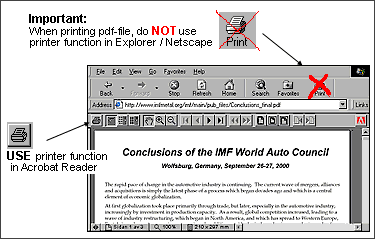
|


